
Book Review: Web Scraping with Python by Ryan Mitchell
Book Bit: Bits and Pieces of Books, Reviews Relevant to Our Age

Link to Book on Publisher’s Website
Overall Summary
"Web Scraping with Python…" is perhaps the best coding book I have read thus far in terms of the non-coding information. Published in 2018, much of the technical information is probably deprecated, but the tactics around web scraping in general are great ideas.
Key Points
There are some architectural and procedural points that I would like to highlight for posterity from this book. These are concepts that were either new to me, or at least elucidated in a new way.
Generating Site Maps
When web scraping, creating a sitemap can be crucial to avoid crawling the same page multiple times and to ensure that you are efficiently navigating through the website.
This involves basically maintaining a set of visited normalized URL’s. The book recommends using python sets for that, similar to the following:
import requests
from bs4 import BeautifulSoup
from urllib.parse import urljoin, urlparse

# Initialize the set of visited URLs
visited_urls = set()

# Start URL
start_url = 'http://example.com'

def crawl(url):
    # Check if the URL has already been visited
    if url in visited_urls:
        return

    print(f'Crawling: {url}')

    try:
        # Send a GET request to the URL
        response = requests.get(url)

        # Check if the request was successful
        if response.status_code == 200:
            # Add the URL to the set of visited URLs
            visited_urls.add(url)

            # Parse the HTML content of the page with BeautifulSoup
            soup = BeautifulSoup(response.text, 'html.parser')

            # Find all links on the page
            for link in soup.find_all('a', href=True):
                # Construct absolute URL
                absolute_link = urljoin(url, link['href'])

                # Parse the URL to remove fragments, parameters, etc.
                parsed_link = urlparse(absolute_link)
                clean_link = parsed_link.scheme + '://' + parsed_link.netloc + parsed_link.path

                # Recursively crawl the found link
                crawl(clean_link)
    except Exception as e:
        print(f'Error: {e}')

# Start the crawl from the starting URL
crawl(start_url)
PDF Mining
You can consider PDF mining a part of web scraping! Just use a library such as pdfminer in python to read PDF’s from local file objects to convert them to a string. This is not mentioned in the book, but there are services such as textract which can do this as well.
import io
from pdfminer.converter import TextConverter
from pdfminer.pdfinterp import PDFResourceManager, PDFPageInterpreter
from pdfminer.pdfpage import PDFPage
from pdfminer.layout import LAParams

def read_pdf_to_string(file_path):
    # Create a PDF resource manager object
    resource_manager = PDFResourceManager()

    # Create a file handle to store the text data
    fake_file_handle = io.StringIO()

    # Create a TextConverter object to convert PDF to Text
    converter = TextConverter(resource_manager, fake_file_handle, laparams=LAParams())

    # Create a PDF interpreter object
    interpreter = PDFPageInterpreter(resource_manager, converter)

    # Open the PDF file
    with open(file_path, 'rb') as file:
        # Process each page in the PDF file
        for page in PDFPage.get_pages(file):
            interpreter.process_page(page)

    # Get the entire contents of the PDF as a string
    text = fake_file_handle.getvalue()

    # Close the converter and fake file handle
    converter.close()
    fake_file_handle.close()

    return text

# Example Usage:
file_path = 'path_to_your_pdf_file.pdf'
pdf_text = read_pdf_to_string(file_path)
print(pdf_text)
OpenRefine
OpenRefine is a tool used for cleaning and enriching datasets. Typically this is used as desktop program but it can be used via a python client.
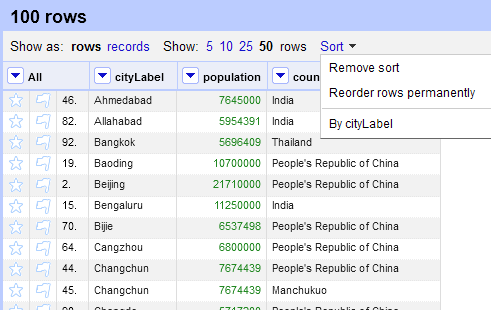
Here’s an example of how it could be used with python, assuming OpenRefine running:
import requests
import json

# OpenRefine server details
openrefine_host = 'http://127.0.0.1:3333'

# CSV file path
file_path = 'path_to_your_csv_file.csv'

# Project metadata
project_name = 'MyProject'
project_options = {
    'project-name': project_name,
    'separator': ',',
    'quotechar': '"',
    'encoding': 'UTF-8'
}

# Read the CSV file content
with open(file_path, 'r', encoding='utf-8') as file:
    file_content = file.read()

# Create a new project in OpenRefine
response = requests.post(
    f'{openrefine_host}/command/core/create-project-from-upload',
    files={'project-file': ('data.csv', file_content)},
    data=project_options
)

# Check if the project is created successfully
if response.status_code == 200:
    project_id = json.loads(response.text)['projectID']
    print(f'Project {project_name} created with ID: {project_id}')
else:
    print('Failed to create project:', response.content)
Python Requests
Python Requests should be a fairly well-known library to a lot of folks already, it’s basically the way to perform the equivalent of a curl command.
I just wanted to note here that Python Requests can also be used to activate radio buttons, checkboxes and other inputs, including logging in and using cookies, which is useful in web scraping.
Undocumented API’s
Interestingly, there are ways of finding undocumented API’s on pages by using a tool such as the browser (Chrome) network inspector tool and looking at the various calls being made.
You can look for API calls by looking for network calls that have JSON or XML in them, and with GET requests, the URL may contain parameter values passed to them. Looking for API calls of the type XHR. Once you go down this route, you can start Documenting Undocumented API’s by looking for the HTTP methods used, inputs (including path parameters) and outputs.
The author built a tool which can be used to automate some of this activity which they posted here.
Defeating CAPTCHA
Honestly, this is probably the most deprecated part of the book, but worth noting as a lot of websites have CAPTCHA (or rather, modern equivalents of CAPTCHA) to prevent scraping.
Avoiding Traps
The author notes that the fundamental challenge of scraping is to be able to look like a human for the detection level put on the site. Most sites don’t have a very high barrier at all. There are a few key techniques just to up your game:
Use the Python requests library and beautiful soup to feed in a header which makes you look like an actual computer rather than a scraper. The default header just shows you as a scraper.
Some websites use Cookies, and will cut you off if you look like a robot, because you close and open forms to fast, basically do the functions in the request libraries too quickly.
EditThisCookie, a browser tool can be used to monitor how Cookies change as you interact with a website. To manipulate cookies, there are delete_cookie() and delete_all_cookies() funtions.
More well protected sites might monitor how you interact with a site, or how much information you download from a site. You can use sleep functions to help deal with this.
Form security features include Hidden Input Field Values, such as a field that would not be visible to a human, for example on the Facebook login page, there are actually three fields. Filling out the third field blocks your scraper from the website. Sometimes these fields are honeypots and are even named, “email” or “name.” This may also include different kinds of links and buttons or images which should not be accessible by a human.
For example, this page has hidden information that can be viewed in the CSS.
There is a suggested checklist to try which one can use to work through to diagnose why one keeps getting blocked from a site as a scraper, which includes 1) Honeypot Javascript 2) Formatting 3) Problems with Logging in and Staying Logged In via Cookies 4) Blocked IP address if you keep getting 403 errors. This can be fixed by moving to a Starbucks.
Finally, crawling in parallel and cloud crawling is discussed.
Testing Your Own Website With Scrapers
Hey, once you know how to scrape websites, why not scrape your own?
If you’re familiar with the concept of unit testing, then just think about how you can use scraping, “against,” your own website as a sort of contract to ensure that it is up and working.
In fact, you can actually use python unittest and combine it with web scraping methodologies to achieve this.
My Editorialization as a Reader
I think I covered the vast majority of everything above and there isn’t much more to say. This is a great book.